


To create your Archive page, follow the steps below:
1. Create a new page by going to Pages > Add New

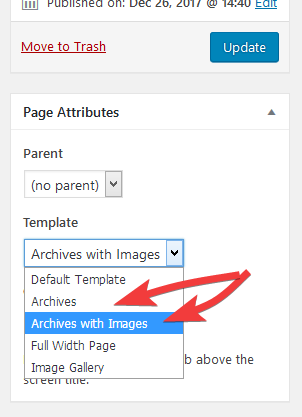
2. Look for the 'Page Attributes' box on the right of the screen.
3. Change the 'Template' option to 'Archives' if you would like a simple text-based list. Select 'Archives with Images' if you would like to show posts with images.
Affiliate Disclaimer: I sometimes insert third-party links to products and services to help cover the costs of running this website. I only recommend products that I have used and think are worth trying. Your free will ❤ Donation will be appreciate 😍
Follow me on: Facebook | Twitter | Instagram | Linkedin | Tiktok | YouTube
Disclaimer: The materials on this website are given for general information only and do not guarantee 100% solution. I accepts no responsibility for loss or liability occasioned to any person acting or refraining from acting as a result of material contained in this website.
Post a Comment