


You may notice that the comments section of your blog posts is not showing. This is usually caused by one or both of the following reasons:
Comments are disabled on your blog
You should check the settings under the Settings > Posts, comments and sharing section of your Blogger dashboard. You should select "Embedded" from the options, as shown below:
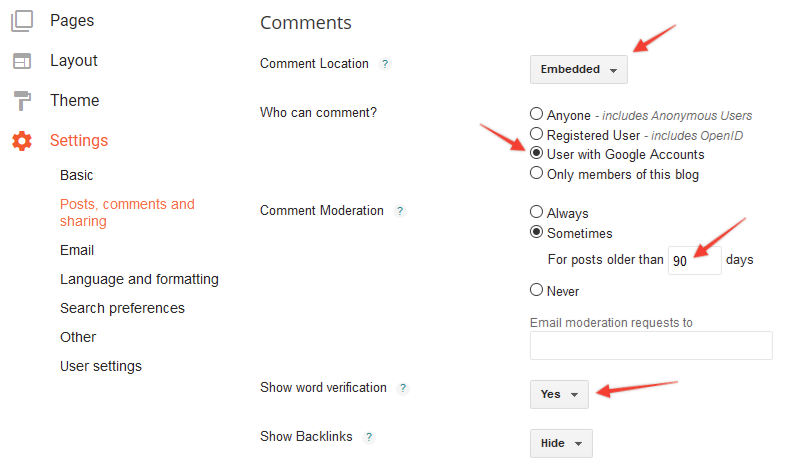
We have also highlighted some extra options which you may wish to consider enabling to stop spam comments.
Comments are disabled on individual blog posts
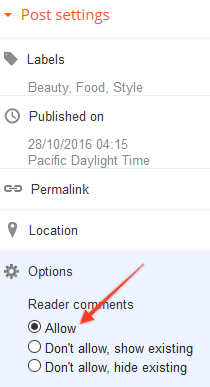
You should also check that comments are not disabled in each blog post's settings. You can do this by looking at the options on the right side of the screen whilst editing a post, as shown below:
Affiliate Disclaimer: I sometimes insert third-party links to products and services to help cover the costs of running this website. I only recommend products that I have used and think are worth trying. Your free will ❤ Donation will be appreciate 😍
Follow me on: Facebook | Twitter | Instagram | Linkedin | Tiktok | YouTube
Disclaimer: The materials on this website are given for general information only and do not guarantee 100% solution. I accepts no responsibility for loss or liability occasioned to any person acting or refraining from acting as a result of material contained in this website.
Post a Comment