


Note: this guide is for setting up static pages, such as an “About Me” or "Contact" page. If you would like to add a category of posts to a page, please see this guide instead.
How to add a page to Blogger/Blogspot:
The steps are also listed below:
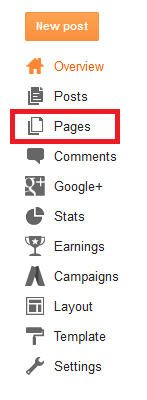
1. Go to the “Pages” section of the dashboard:
2. Click the “New page” button near the top of the screen:

3. Enter all of the details you would like in your page.
4. Don't forget to give your page a name/title at the top.
5. Click “Publish” to finish creating the page:

Ok, now your page is created! ...but why isn't it showing in the menu yet? Well, we still need to do that...
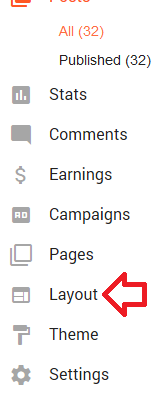
6. Go to the “Layout” section of the dashboard:
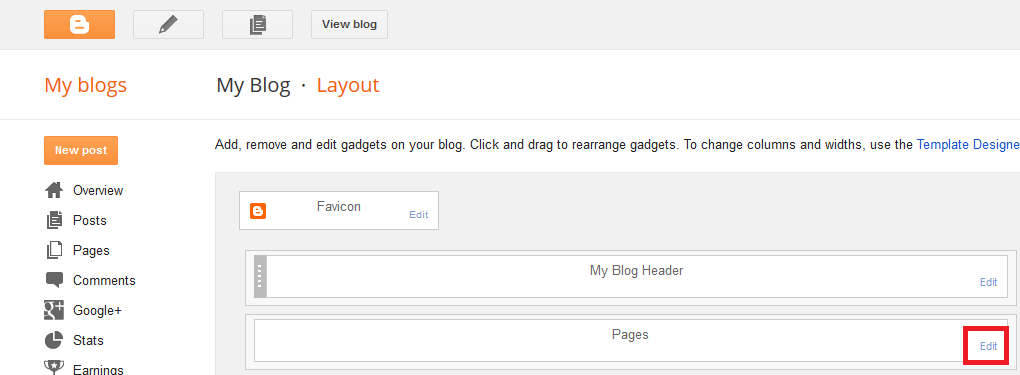
7. Click the Edit button in the “Pages” gadget:
8. Select the pages you would like to appear in the navbar and click “Save”:
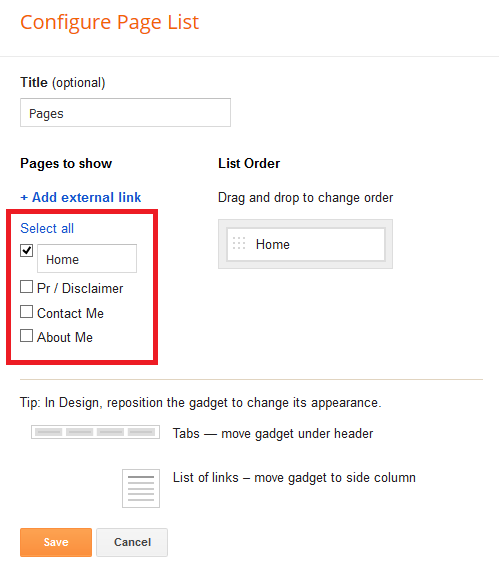
You can also re-order the menu items by clicking and dragging them in the "List Order" section of this window.
Note: this guide is for setting up static pages, such as an “About Me” or "Contact" page. If you would like to add a category of posts to a page, please see this guide instead.
Affiliate Disclaimer: I sometimes insert third-party links to products and services to help cover the costs of running this website. I only recommend products that I have used and think are worth trying. Your free will ❤ Donation will be appreciate 😍
Follow me on: Facebook | Twitter | Instagram | Linkedin | Tiktok | YouTube
Disclaimer: The materials on this website are given for general information only and do not guarantee 100% solution. I accepts no responsibility for loss or liability occasioned to any person acting or refraining from acting as a result of material contained in this website.
Post a Comment